 AI
AI
88% of Companies Use AI. What Sets High Performers Apart

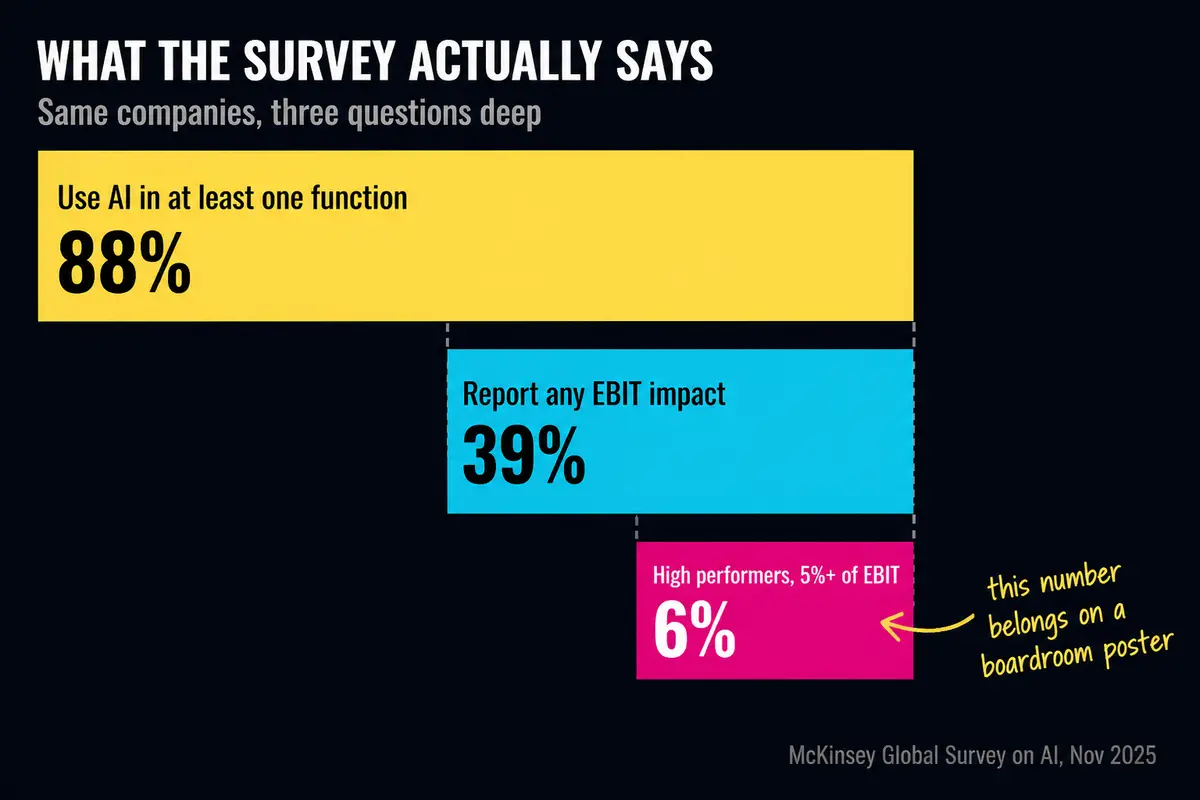
In McKinsey's report published in November 2025, 88% of respondents reported regular AI use in at least one business function. 39% reported an impact on earnings before interest and taxes, or EBIT. About 6% qualified as AI high performers: they attributed at least 5% of EBIT to AI and reported significant value from it.
The gap comes from how companies approach adoption.
Why the reports look great but the work speed stays the same
When a company rolls out an AI assistant - say, a corporate chatbot connected to a large language model - leadership sees encouraging numbers on the dashboard. A dashboard is a screen that displays usage metrics, showing how many people are "using" the system.
The problem is in how "user" gets counted. Anyone who logs in even once during a month enters the statistics. Opening the system once is enough to count as an active user.
So the reports look optimistic. The reality is different.
When assessing a rollout, it helps to separate three groups and measure their shares in your own company:
- Employees who use AI daily and adapt it to their work.
- Employees who use it occasionally.
- Employees who have not found a useful workflow yet.
Who pays and who works: the gap between licenses and real use
In large deployments - where a company buys thousands of licenses and pays tens of millions of dollars a year - the picture sharpens further.
Token spending may be unevenly distributed. Tokens are units of text processing that affect AI costs. Compare spending by task and team against the value of completed work.
The company pays for thousands of seats. A small group uses them at full capacity.
Adoption figures need their methodology checked. Issued licences, employee activity and profit impact measure different things.
A tale of two engineers: why the same tool produces opposite results
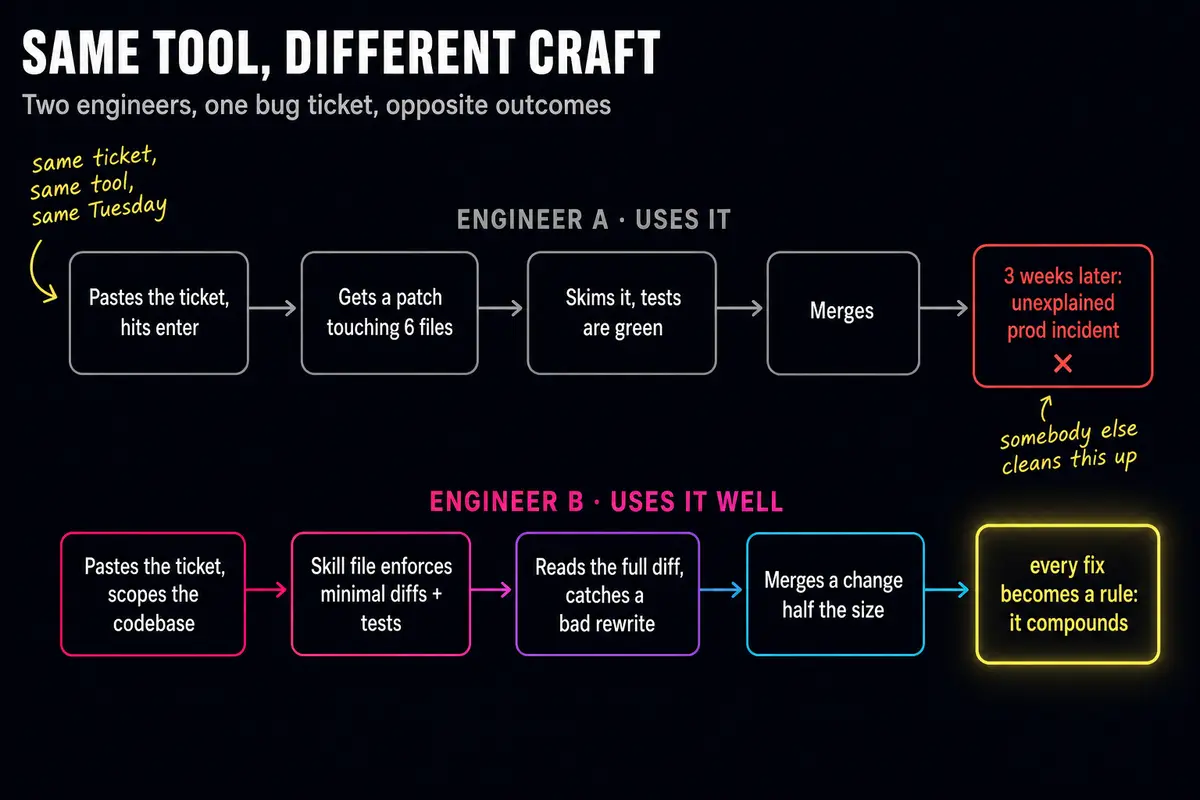
Two engineers receive the same task. Both use AI. The outcomes are opposite.
The first pastes the task into AI, gets edits across six files at once, glances at the green test results - everything passes - and accepts all the changes. Three weeks later the server breaks. The cause: AI silently changed one configuration setting that was never supposed to be touched. The first engineer missed it because he did not read every change.
The second engineer works differently. She tells the AI where the code lives and what must not be touched. She maintains a skill file - a plain text file the AI reads before every new task, like a standing instruction sheet. She reads every proposed change herself, spots the unnecessary edit, and rejects it. She accepts half as many changes as the first engineer. Each time AI does something wrong, she adds a new rule to the file - and week by week the AI performs more accurately for her.
The first engineer created a failure that someone else spent hours fixing. The second saved time and created no problems.
Same tool. Different skill.
Why prompting courses cover a small part of the skill
Working well with AI means doing several things at once. Keeping context clean - meaning not feeding the AI so much irrelevant information that it gets confused. Maintaining skill files. Understanding that AI makes mistakes and checking the output. Knowing which tasks AI helps with and which ones only add work.
Many employees will not do this. Not because they are poor workers, but because it is not their interest or their responsibility.
Prompt-writing courses teach how to phrase requests to AI. That is useful, but it covers a small part of the problem. Training on the team's own real tasks shows who will become an internal AI champion and which processes are worth handing to agents. The real question is different: which processes in this company are worth fully automating, and which ones should not be touched. Every company has its own answer.
Meanwhile, AI vendors keep releasing more powerful tools. The skill ceiling rises. Power users benefit from their colleagues falling behind - their value comes from that gap. They will not share knowledge voluntarily.
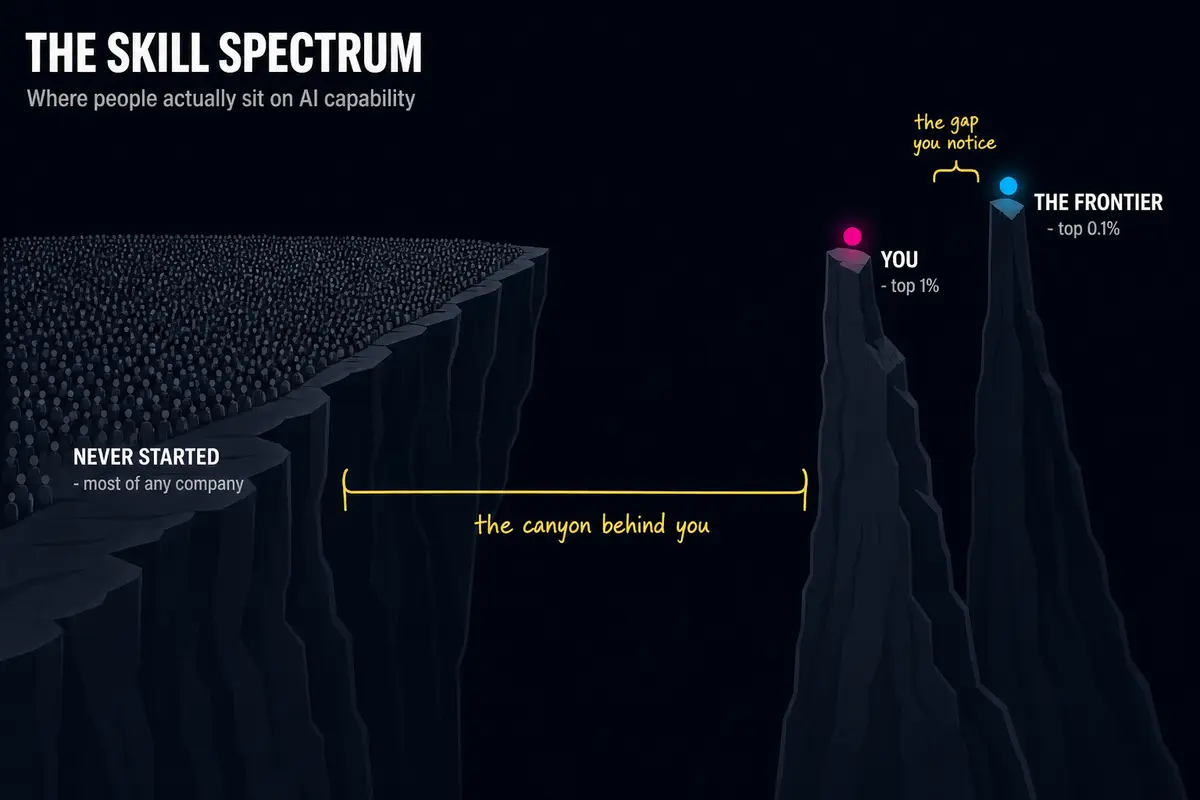
The MIT study uses "GenAI Divide" for the gap between the few organisations with measurable returns and the rest. A similar gap shows up inside companies, between people who can work with AI and those who cannot.
What to do: two paths and three concrete steps
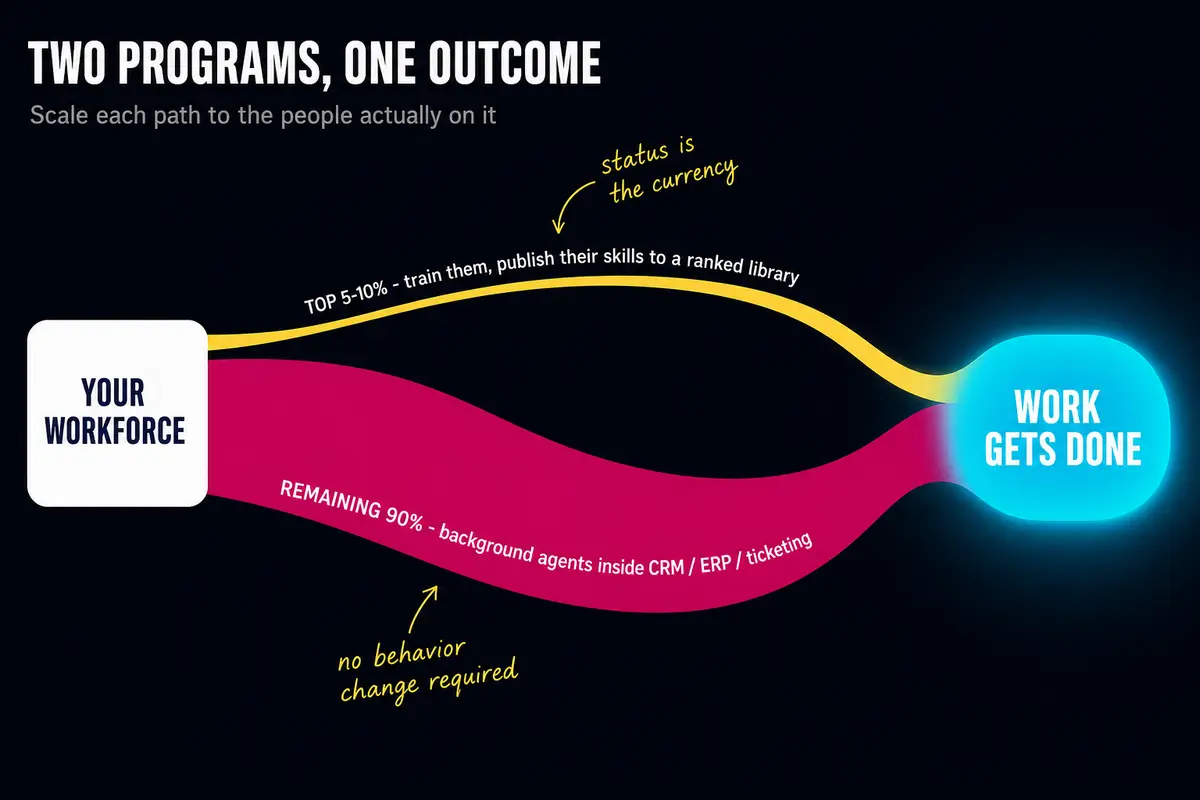
There are two ways to respond to this gap. The first is to train everyone and hope the majority catches up. The second is to accept that most people will not catch up and build a system around that fact.
A combination of both works.
Step one: find the capable people - they hide in unexpected places.
Running training is worthwhile not to turn everyone into a power user. It is worthwhile to find the people who will become power users. Some of them sit in accounting, in logistics, in the call center - places nobody thinks to look. They pick it up fast, start applying it, and within a month noticeably speed up their work.
Step two: give power users status, rather than asking them to share for free.
An internal library where advanced employees post their work - skill files, ready-made prompts, workflow templates - with visible ratings and author names attached. In exchange for losing their edge, they gain recognition. That works better than a corporate memo saying "please share knowledge."
Step three: for repeatable tasks, build agents - not training.
An AI agent is a program that completes a task on its own, without a person involved at every step. It plugs into tools people already use every day: a CRM (customer relationship management system, which tracks client interactions), accounting platforms, or a ticket queue (a list of incoming support requests). The employee does not learn to work with AI - they simply approve, reject, or edit a finished result.
A concrete example: a department that processes incoming invoices. Agents work through the invoices overnight - matching them against contracts, checking amounts, preparing a decision. In the morning, people open the queue and review: "approve," "reject," "clarify." In the morning, people review prepared decisions instead of matching invoices by hand.
How to report to the board so the numbers actually mean something
The standard metric - "adoption rate" or "number of active users" - says nothing about real impact.
A useful report looks different. Take any process and track what share of the work gets done three ways: manually, with AI assistance, and fully automatically. Then watch how that share shifts from quarter to quarter.
If the manual share is falling, the deployment is working. If it stays flat, it is not.
That is a useful indicator for the board's question: "Are we getting a return on AI or not?"
Q&A
We already bought licenses and ran training. What do we do next?
Look at real usage, not login statistics. Find employees who work with AI every day - and start there. Ask them to describe exactly what they do. That gives you a map of the processes in your company that genuinely respond to automation.
Does every employee need a prompting course?
Prompting courses are useful for finding capable people, but do not expect them to change the behavior of the majority. Prompting courses alone rarely change how most people work. Training on the team's own tasks finds capable people and candidate processes. For repeatable tasks, people who do not use AI are better served by agents inside familiar tools.
How do we decide which processes to automate and which to leave alone?
There is no universal answer - every company has its own. A reliable guide: processes with repetitive, predictable steps and a clear output automate well. Processes that depend on judgment, relationships, or unusual situations do not. Start with the first kind.
How do we convince the board that the AI project is working?
Do not show "adoption rate." Show what share of a specific process is done manually, with AI assistance, and fully automatically - and how that share changes each quarter. That is a useful indicator for the question about return on investment.
Majento builds AI agents and deploys them inside client companies. Majento engineers embed in your processes, find the bottleneck, build the system, and stay until results are real - they do not leave after the presentation. If you want to find out where AI can actually help in your company, reach out: t.me/shimaoz or hello@majento.ai.