 AI
AI
How to Organize AI Work in Your Company and Check the Results

Everyone is their own AI department
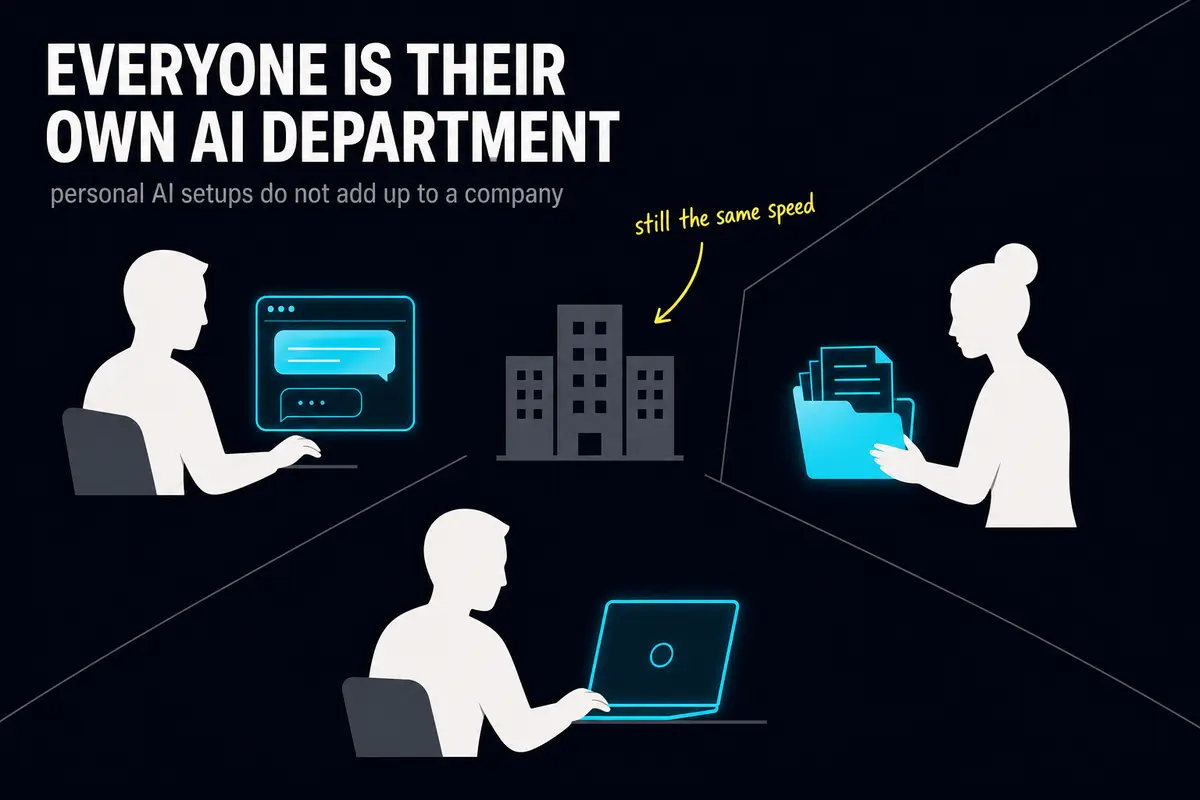
Andrew in marketing has become the best AI user in his company. Over six months he built himself a near-perfect setup: a configured AI assistant, dozens of ready-made instruction sets for his specific tasks, a clear explanation of the brand's voice, product structure, preferred formats. He works fast. He's happy.
Julia in operations keeps a folder of prompts - ready-made instructions she feeds to AI - in her personal cloud storage. Everything is in there: how to write briefs for contractors, how to parse data tables, how to prepare reports for the director. It's a good folder. Julia just never mentioned it to anyone - not out of selfishness, simply because nobody asked.
Igor in IT set up an AI agent - a program that carries out tasks step by step on its own, without constant human input. The agent runs on his laptop. The API key that grants the program permission to use the AI service sits in a plain text file on his desktop.
All three are satisfied. Each one personally got faster. The company as a whole works exactly the way it did a year ago.
This is a composite picture - but almost any company will recognize itself in it. Three people, three islands. Andrew's knowledge dies with his account the day he leaves. A new hire will never find Julia's prompts. Igor's key will eventually leak or get lost, and nobody will know exactly when. The company bought subscriptions, people learned the tools, and there is no shared layer connecting any of it. That is what fragmentation looks like.
What is a harness, and why that word?
The concept has an established English name: AI harness.
The word is well chosen. A harness is what converts a horse's strength into useful work - without one, the horse is powerful and the cart goes nowhere. AI models today are genuinely powerful. But raw power moves nothing on its own. You need a system that directs that power, holds it within the right boundaries, and delivers the output where the company actually needs it.
The term comes from software development. In that context, a test harness is the scaffolding that runs a program under controlled conditions, checks the result, and records what went wrong. Applied to AI agents, the meaning is the same: everything surrounding the model - context, tools, memory, permissions, and rules of behavior - assembled into one managed layer.
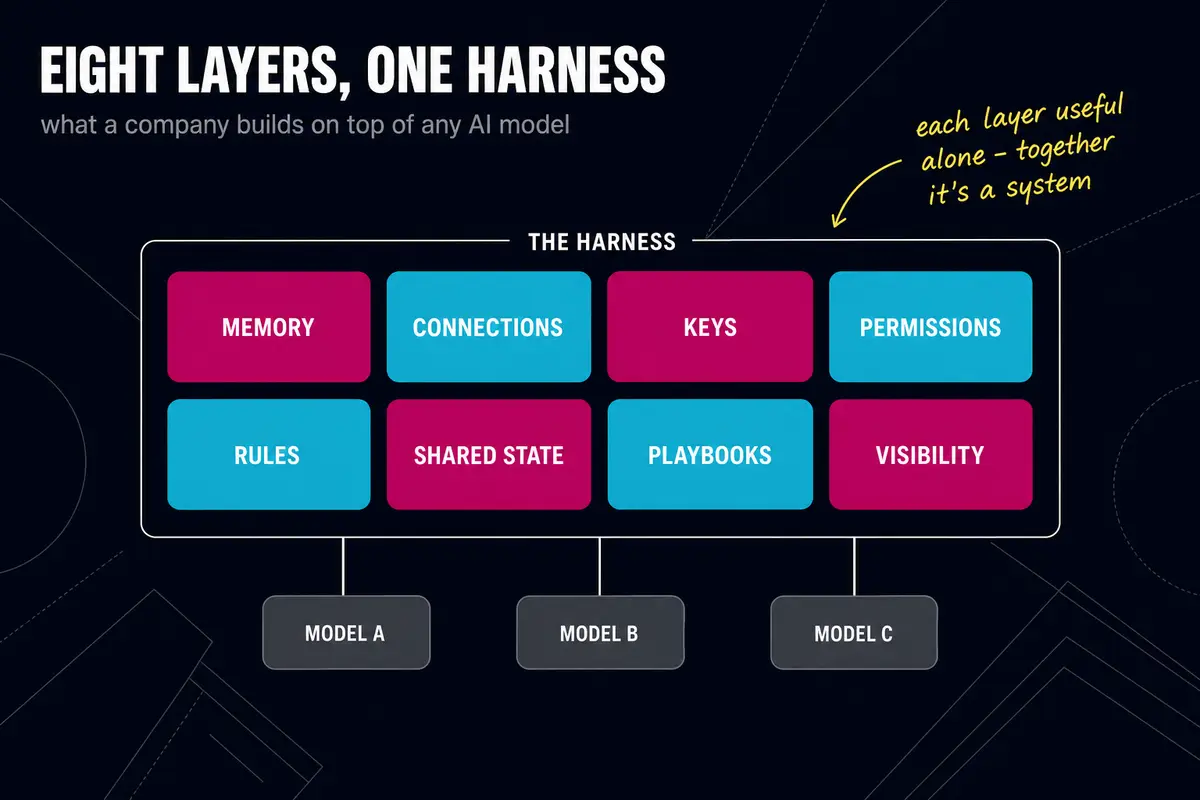
An AI harness is a shared company layer that sits on top of any AI tool. It answers five questions at once: what the AI knows about the company, what it is connected to, what it is allowed to do, what rules it follows, and how the company can see what is happening. Below, we break down the eight layers that make up a harness - each one covers its share of those five questions.
Why "everyone gets a subscription" hits a ceiling
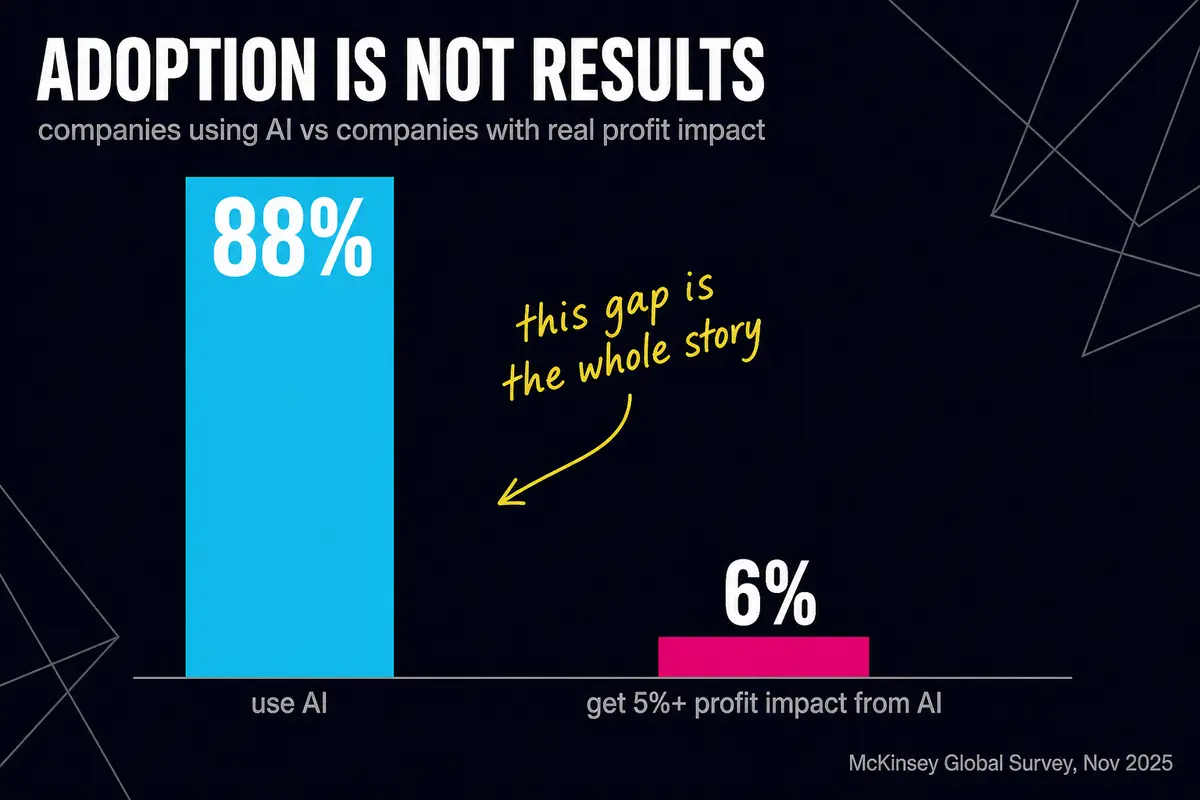
McKinsey's report published in November 2025 found that 88% of respondents used AI in at least one business function. About 6% qualified as high performers: they attributed at least 5% of EBIT to AI and reported significant value from it. This defines high performance, not everyone who obtained any benefit. See our research review.
That number is uncomfortable. In summer 2025, the MIT NANDA project published a report called "GenAI Divide" with an even sharper claim: 95% of corporate AI pilots produced no measurable return. Business media ran with the figure everywhere. Then Wharton professor Kevin Werbach publicly dissected the report and showed that the 95% figure was not supported by the underlying data, and that the absence of quick results does not equal zero value. Expectations genuinely are not being met - but repeating someone else's catastrophe framing uncritically is its own mistake.
Gartner, in June 2025, forecast that more than 40% of agentic AI projects - ones built around AI agents that act autonomously - will be canceled by the end of 2027, as costs climb, value stays unclear, and risks remain poorly managed. S&P Global Market Intelligence surveyed more than a thousand companies across North America and Europe in October 2025: the share that had abandoned most of their AI initiatives grew from 17% to 42% in a single year.
Shadow AI is growing alongside the failures. KPMG and the University of Melbourne surveyed more than 48,000 people across 47 countries in April 2025: 57% of employees hide their AI use at work and present its output as their own. Only 40% say their employer has any rules around AI use at all.
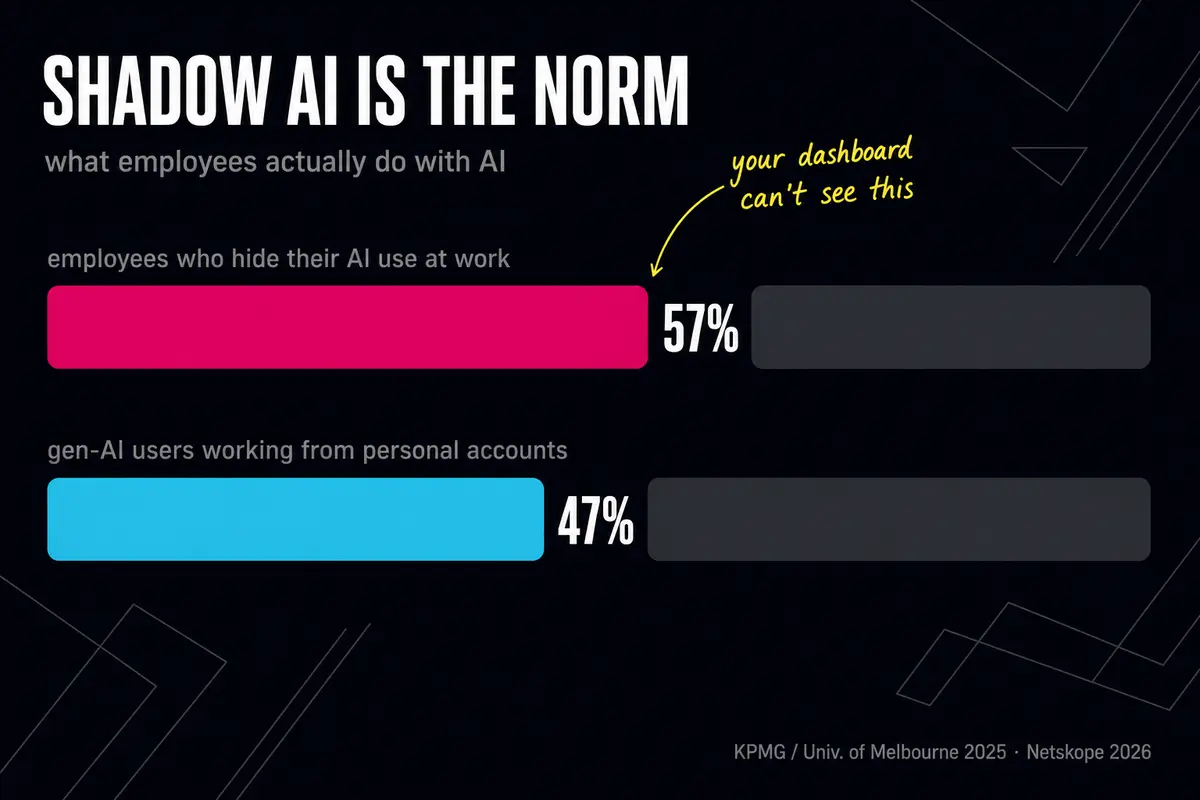
Netskope's 2026 report counted 47% of generative AI users at work accessing it through personal accounts (the company sells corporate traffic security, so read that figure with that context in mind). Zylo, which tracks corporate software subscriptions, paints a related picture: the average company runs seven different generative AI applications simultaneously, spending on them grew 108% in a year, and 60% of IT directors admit they cannot see all the tools their employees are actually using.
Money goes out, tools multiply, and the results stay trapped in personal folders and private accounts.
And that is before the security conversation. GitGuardian, which professionally hunts for leaked credentials, counted in its March 2026 report that 28.65 million passwords and access keys - embedded directly in code - were exposed in public GitHub repositories (the website where developers share their projects) during 2025. That is 34% more than the year before. Leaks of keys specifically for AI services rose 81%. Configuration files used to connect AI tools to work applications contained 24,008 leaked secrets.
In August 2025, researchers documented an attack they called s1ngularity: attackers infected a widely used developer package, and the malicious code instructed AI tools on compromised machines to search the local drive for passwords, API keys, and cryptocurrency wallets. Researchers at Wiz found that more than a thousand active GitHub access keys were exposed, along with roughly 20,000 files. A key sitting in a plain text file on the desktop is an open door for exactly that kind of attack.
What a harness is made of
A harness has eight layers. Each can be built independently, but they function as a system. Here is each one in order: what it is, what breaks without it, and what a minimal working version looks like.
Company memory
This is the knowledge base the AI reads before it works. Not one employee's personal notes - what the company knows as an organization: products, clients, processes, decisions that were made and why.
Without shared memory, every employee explains the same things to the AI from scratch. Andrew's AI knows the brand voice. The new manager's AI knows nothing. Knowledge accumulates with individual people, not with the company.
The minimal working version is a file of rules the AI reads before each task (in technical practice this is sometimes called a skill file or system prompt). One file, accessible to everyone, containing basic company facts, communication tone, and explicit prohibitions. It can be written in a day.
Connections to work tools
AI becomes useful when it works with real company data: reading email, writing to the CRM (the system that tracks customer relationships), creating tasks in a project tracker, querying spreadsheets. All of that requires connections.
In 2025, all major AI developers adopted a single open standard for these connections - MCP, short for Model Context Protocol, which functions as a universal connector between AI and work applications. In December 2025, the standard was transferred to an independent foundation under the Linux Foundation. By mid-2026, the official registry held around 10,000 ready-made connectors: for email, calendars, CRMs, spreadsheets, and storage systems.
When there is no shared connection layer, everyone builds their own. Andrew connected AI to email - Julia doesn't know how. Igor wrote a script for the CRM - it lives on his laptop. When Igor leaves, the script leaves with him.
The minimal working version is a registry of connections the company has approved and configured centrally. A new employee picks up what is ready rather than building from zero.
Access keys
An access key is the credential a program uses to get permission to call an external service. Every connection needs one. This is the most vulnerable point in any AI system.
We ran into this ourselves. Access keys were sitting in personal files on employees' laptops. When someone changed machines or left the company, access was lost - and nobody knew who had been using what. It always surfaced at the worst possible moment.
The Identity Defined Security Alliance stated clearly in 2026: AI agents should not be issued permanent keys. An agent receives a short-lived credential scoped to a specific task, and neither the agent nor the human ever sees the actual key value - it is injected automatically from a secure vault at the moment of use.
The minimal working version is a shared secrets vault where the key is issued to the program, not stored in a file on someone's desk. This is handled by standard tools already available in most corporate environments.
Access permissions
Not every AI should see everything. An agent that writes social media posts has no business touching financial data. An agent that handles customer requests should not be able to change system settings.
Permissions create predictability. When an agent can do anything, nobody knows what it will actually do. There is a separate breakdown of how to structure this correctly: access permissions in the company brain.
Without explicit permissions, we experienced this: two agents edited the same files simultaneously and overwrote each other's work. Nobody had set any restrictions - both agents believed they were doing the right thing. Now parallel work runs in separate copies, each agent has its own, and the rules about who works with what are written down.
The minimal working version is a written list of "what the agent does on its own versus what requires a human to confirm" - not an informal understanding that exists only in someone's head.
Rules of behavior
This covers how the AI should conduct itself: what tone to use, what it must not say, how to handle confidential information, when to stop and ask a human.
The logic is simple: the AI speaks on behalf of the company, so the company decides what it is not allowed to say.
We had a situation (no client names): two employees independently improved the same rules file for an AI. The result was two incompatible versions. For a period, agents used by different people behaved differently - one answered in one style, another in a different one. The problem surfaced by accident, not by design. The fix was a single shared rules file with a change history, so it is always visible who changed what and when.
The minimal working version is one rules file, one version, one location. Every AI tool in the company reads it.
Shared project state
When there is more than one agent and they work with shared data, synchronization is necessary. Otherwise two agents pick up the same task, or one overwrites what the other just completed.
This is about state: who is currently doing what, which tasks are in progress, what is finished. In a human team, that is handled by standups and project trackers. In a team of agents, it requires a layer that stores that state and distributes tasks without conflicts.
The minimal working version is even a simple task log that agents check before starting work. The critical thing is that it is shared - not a separate log for each agent.
Reusable work
This is a library of what already works: tested prompts, task templates, examples of good output. The kind of thing Julia keeps in her personal folder - made available to everyone.
Without it, every new employee starts from zero. The company reinvents what it already figured out six months ago. Knowledge does not accumulate.
A shared library of reusable work carries a risk: knowledge from one client's project can end up in work for another. The rule that addresses this is separation - each client gets their own knowledge set, keys, and access, and only material that contains no client-specific data goes into the shared library. That reduces the risk but does not eliminate it. Within the company itself, reusable work should be shared - that is the opposite problem.
The minimal working version is a shared-access folder of prompts, with author names and a date of last review. Simple to set up, and knowledge stops dying in personal clouds.
Synchronization and visibility
The final layer is the company's ability to see what is happening. Total AI spending across all subscriptions. Which agents are active right now. What they did yesterday. Where something went wrong.
When an agent makes a mistake in a client email, the trail should be findable in minutes, not reconstructed from memory. When AI costs triple, a specific person should notice - not an annual audit.
The minimal working version is an agent activity log and a single point for tracking costs. No complex system required - sometimes a spreadsheet that someone reviews once a week is enough.
The harness lives separately from the chat window
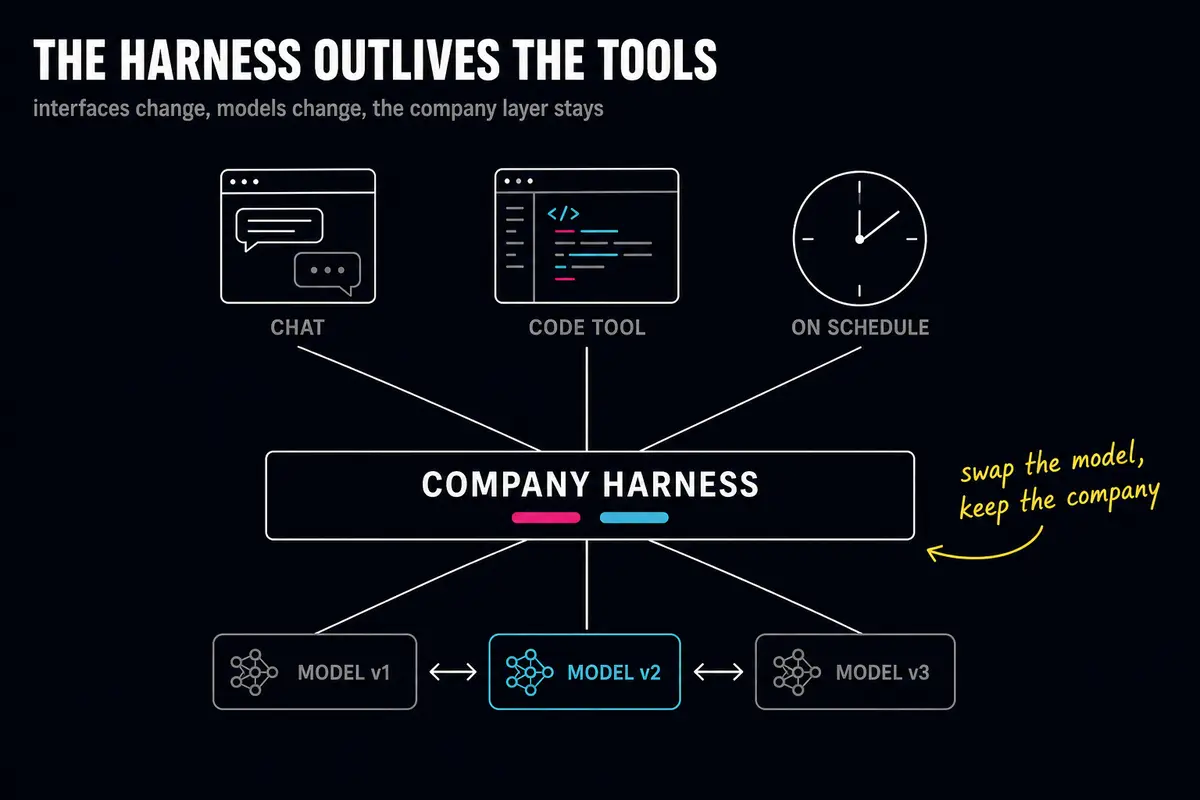
One technical detail worth getting right: the harness is not an interface. It is not tied to a specific chat window or a specific AI tool.
A developer works inside a coding environment - the harness is there. A manager opens a chat - the harness is there too. Some tasks run on a schedule with no open window at all - the agent simply does the work overnight. In all three cases, the same company memory applies, the same keys, the same rules.
This matters for one reason: AI models change fast. The model you use today may be replaced by a better one next year. If the company's knowledge, connections, and rules live inside a specific tool, switching tools means losing everything. If they live in a separate layer, you swap the model and the company keeps working.
The harness is what stays with the company when models come and go.
What changes when the harness is shared
Three concrete things.
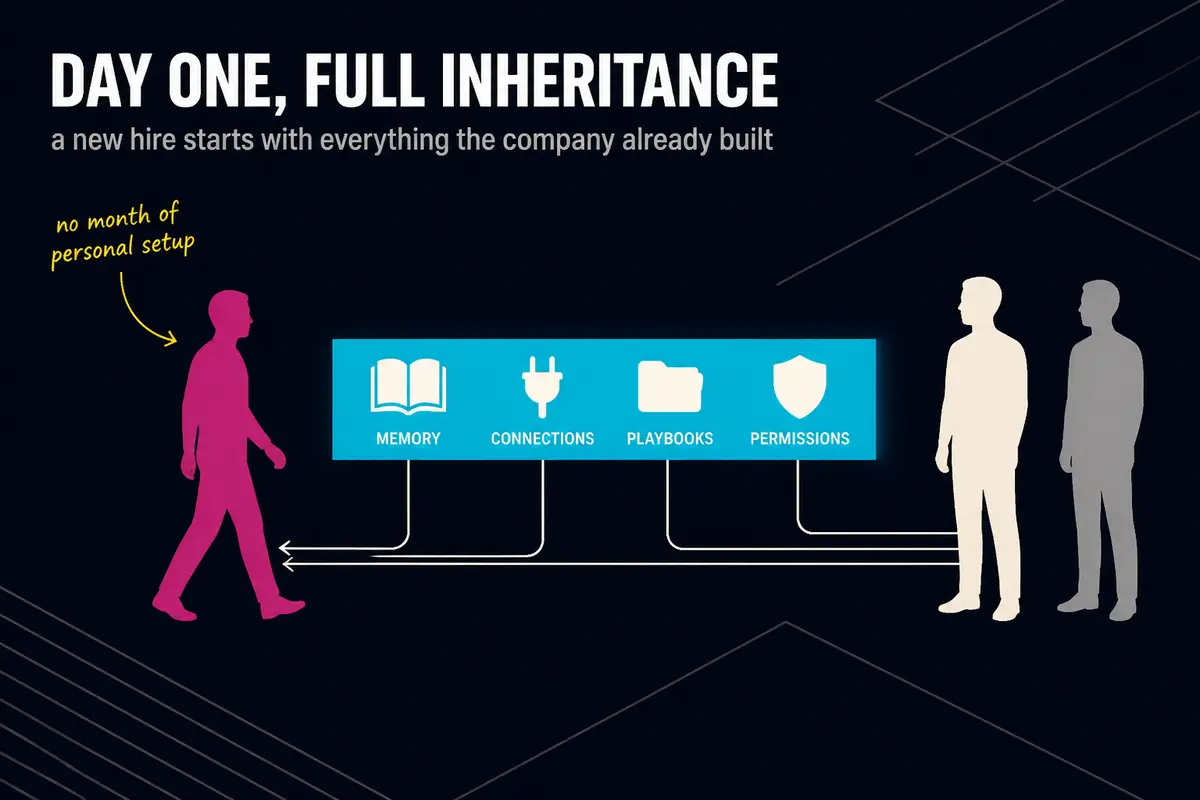
First: a new employee on day one gets ready-made connections, rules, and reusable work. They do not spend a month "setting up AI for themselves" - they start immediately with what the company has already built. Julia's prompt folder is now theirs too.
Second: a non-technical employee works from the same knowledge base as an engineer. A marketer asks a question about a product - the AI answers from the same company memory the engineer uses for technical details. One layer means consistent answers.
Third: an agent gets a defined role and limited access - like a new employee given a specific area of responsibility and told clearly that they do not act outside it. The agent is neither all-powerful nor blind. It works within boundaries the company itself set.
Where to start on Monday
Start with an audit. These are the ten questions we ask at the beginning of every company engagement. The answers will show how deep the fragmentation already runs.
- If your most advanced AI user quit tomorrow - what would remain with the company?
- How many personal AI accounts are being paid for with employees' own cards?
- Where are the access keys to AI services, and who can actually list them?
- Is there a place where a new hire picks up tested prompts and rules - or does everyone start from scratch?
- Can one employee's AI benefit from something the company learned last quarter?
- Does anyone see total AI spending across all subscriptions combined?
- What can an AI agent do without human approval - and is that written down anywhere outside someone's head?
- If an agent makes a mistake in a client email, what trail exists to understand what happened?
- Does AI give the same answer to the same question when two different employees ask it?
- Could you switch to a different AI model within a week without losing your accumulated work?
If most answers are "I don't know" or "no" - fragmentation is already there, and it is already costing money.
After the audit comes the build sequence. There is no need to construct everything at once.
In the first month, three things are worth doing. One - a shared secrets vault: move access keys out of personal files and set up centralized credential management. Two - a single shared knowledge base with access controls defining who sees what. Three - a library of tested reusable work: gather what is already working for your best AI users and make it available to everyone.
For later: detailed agent behavior policies, automatic state synchronization between agents, complex permission schemes. Those matter, but they are the second step. The first step is to stop losing what the company already has.
A company either builds a shared layer or pays for a set of personal toys
AI in a company without a harness is several smart people with good personal tools. They got faster. The company did not.
A harness does not make AI smarter. It makes sure that what AI can do works for the company - not just for one individual. Knowledge accumulates. Connections serve everyone. Keys do not leak. Agents do not get in each other's way.
Q&A
What is an AI harness in plain terms?
An AI harness is a shared company layer that sits on top of any AI tool. It brings together eight components: company memory, connections to work applications, secured access keys, permissions, rules of behavior, shared task state, reusable work, and an activity log. All of it lives separately from any specific AI chat or tool - and stays with the company when models and products change.
How is a harness different from buying a corporate AI subscription?
A corporate subscription gives everyone an account and, sometimes, basic security settings. A harness is what the company builds on top of any tool: its own memory, its own connections, its own rules. A subscription answers "does everyone have access?" A harness answers "is AI working for the company, or just for individuals?"
Where should a small company start?
Three steps in the first month. Move access keys out of personal files into a shared vault. Build one knowledge base with basic company facts and communication tone. Create a shared folder of tested prompts. None of this requires a technical team - it requires a decision and regular time to keep things in order.
What happens if a company skips building the shared layer?
Several scenarios that play out regularly. A key employee leaves and their AI work goes with them. An access key leaks from a personal file and the company finds out after the fact. AI gives different answers to the same question depending on who asks - and a client receives contradictory information. AI costs grow and nobody knows what for. Gartner forecasts that more than 40% of agentic AI projects will be canceled by the end of 2027 because of rising costs, unclear value, and weak risk controls. Some of those reasons, untracked costs and weak risk controls, are exactly what a shared layer addresses.
Majento builds AI agents and deploys them inside companies: our engineers embed in your processes, find the bottleneck, build a working solution, and stay until there are results. If you want to figure out where to start in your specific situation, write on Telegram t.me/shimaoz or email hello@majento.ai.
Sources
- KPMG publication
- cybersecuritydive.com publication
- zylo.com publication
- blog.gitguardian.com publication
- McKinsey: The State of AI
- Fortune publication
- Futuriom publication
- Gartner publication
- spglobal.com publication
- anthropic.com publication
- digitalapplied.com publication
- wiz.io publication
- idsalliance.org publication